WordPress主题:STheme
主题简介:
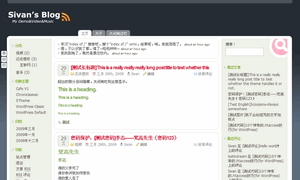 STheme算是我制作的第一个WordPress 主题,外框改造自Songtaste,内容部分全部由我重新设计。该主题无需插件,支持Widgets,主页可设置博客公告(也可用来显示Twitter或滔滔等微博客更新)。最早的版本于08年夏天放出,后来我把它整理升级到2.7,同时添加了一些新功能并修复了一些bug。而后我又把它提交到了Wordpress官方的主题目录。
相关标签:
三栏,固定宽度,支持 Widget,白色,绿色,灰色,后台选项。
主题版本:
2.2.8.4(20100416)
主题链接:
支持版本:
WordPress 2.7 或更新
主题演示:
主题下载:
测试验证:
通过IE6/7,Firefox3,Opera 9,Safari 4和Chrome 1.0浏览器测试,通过XHTML 1.0 Transitional和CSS 3验证。
主要功能:
- 支持Wordpress2.7的嵌套留言,分离评论与TB。
- 主页、归档页、作者页分别定义样式。
- 标题、关键字等SEO。
- 快捷键发表评论。
- 评论表单自动填写。自动填写已评论过用户的个人信息。
- 浏览器标题体验修改。对发表过评论的用户显示欢迎信息。
- 右侧栏可收缩。方便读者阅读,通过cookie保存用户设置。
- 支持中英文。
- 后台设定公告板。
- 后台设定是否使用Logo图片。
- 后台设定使用圆角边框。
- 后台设定页检查主题更新信息。
主题语言:
支持英文、简体中文和白俄罗斯语,其中英文是默认设置。
若要在英文版中使用简体中文,请执行以下步骤(Wordpress中文版用户无需此步):
- 打开 WordPress 根目录的文件 wp-config.php
- 查找 define ('WPLANG', ''); 并修改为 define ('WPLANG', 'zh_CN');
安装方法:
- 上传stheme目录到wordpress的/wp-content/theme/目录下。
- 进入Wordpress后台,在外观——主题中选择STheme并开启。
- 在外观——“STheme Option”页设定主页公告内容。
- 打开博客看效果。
主题说明:
- 页面左侧的三个按钮依次为“返回博客主页”、“管理员邮箱”、“登录后台”。如需更改功能请参考主题的说明文件。
- 支持主页公告板,后台设定是否显示及内容,支持HTML代码。
可以在这里添加Twitter、滔滔等,使用方法参考在STheme中显示Twitter。 - 自行选择使用图片或文本显示博客标题及副标。
- 自行选择使用圆角边框。(不支持IE、不符合CSS3)
更新记录:
- (20100416)
添加了白俄罗斯语言文件,感谢Marcis G.的翻译。
修正了段落的间隙问题。 - (20090501)
修复页面中评论错位的bug。
修复页眉菜单显示深度。 - (20090422)
修复部分CSS,内容区域采用960px宽度。
添加默认logo图片及PSD。
添加显示logo标题代替文本的选项。
添加使用圆角边框的选项。
添加版本信息在主题设定页,方便检查主题更新。 - (20090417)
修复长(多)分类显示换行问题,内容过多自动隐藏。
修复中文显示的日期翻译问题。
添加内容区域的表单、大标题的CSS。 - (20090413)
修正标题显示,兼容Opera浏览器。
修正Safari浏览器下的错位问题。 - (20090407)
添加后台选项。
删除Twitter代码,Twitter及滔滔改为在后台手动添加。
删除logo.gif及logo.psd。
修正标题图片为文本。
修正RSS图片链接。
修正说明文件。
It's cool 😯
2009-04-03 15:48 | #1@derek , 这个是很COOL 哦。
2009-10-31 18:36 | #2这个,要支持一下,有空去研究研究~
2009-04-04 20:18 | #3还记得我那个.in的blog么?因为是德语的,所以用这个主题的时候感觉题目里的字母太紧凑了。不知道下一次更新的时候可不可以考虑改善一下。 😛
2009-04-12 23:50 | #4临时解决方法:style.css找到.posttitle h2, .posttitle h2 a 这里,添加一个letter-spacing属性,设为0或1px均可。
2009-04-13 11:02 | #5嗯,这个问题解决了。不过我又发现一个问题……(别PIA我- -)
2009-04-13 14:09 | #6就是像g,y这样的字母,下面会少那么一小部分。 😐
这是line-height跟字体造成的,不过我用IE跟FF看你博客都没发现这个问题啊,显示的好好的= =
2009-04-13 15:17 | #7😕 Opera下的问题。我修正了一下CSS,.posttitle h2, .posttitle h2 a 的line-height跟max-height都加到20px,下面.postmeta的margin改为3px 0 0 3px。这样我看opera下也没什么问题了。 这些CSS的微调下个版本都会调整,现在已经修复了一些自己发现的bug。 😉
2009-04-13 15:30 | #8收到。 等我的空间转移后再改一下,懒得再备份一次了。><
2009-04-15 13:49 | #9因为一直用Opera,所以不妨就给你当Opera下主题测试员好了,哈哈。
我眼神好,一眼就瞄上了,呼呼,,不错,谢谢你的劳动成果。
2009-04-17 08:16 | #10😉 刚通过了wp官方的审核,不过还要更新一些代码。
2009-04-17 09:53 | #11Hello,
How can I edit the title and tag line of Stheme to use an image instead of text?
Regards,
2009-04-19 03:24 | #12Vineeth, India
Here is a CSS code at "readme.txt" to use logo image instead of text.You can just creat a logo image at template image folder to show it 😀
2009-04-19 12:02 | #13But can't locate "readme.txt" file within my STheme folder or the theme ZIP file that I downloaded. I can't also find a templates folder as well. Please help.
2009-04-19 21:06 | #14Maybe the ZIPfile downloaded from wordpress official site didn't contain it 😐 .I will fix the problem at next vision.Now you can download the theme file from my site.
2009-04-19 22:38 | #15The template folder I mean is "wp-content/themes/stheme/images" folder,you must creat a logo.gif. At first I put a PSDtemplate in ZIPfile but WordPress.org didn't allow me to do it.The theme must have a title and tagline,so we need to edit this area by ourselves. 😕
Ok, is there a way to edit the font of the Title and tag line? I tried a bit but failed...
2009-04-20 18:58 | #16Of course.
You can edit the font at style.css.The related code is
#logo h1 a {font-family:Verdana,Tahoma,Arial,Helvetica,sans-serif;}and
#logo .description {font-family:Verdana,Tahoma,Arial,Helvetica,sans-serif;}You can change the font-family to what you like.
2009-04-20 20:16 | #17I changed the above values but they are not working. The title and description has the same old...
2009-04-21 15:06 | #18It changes.It's "Helvetica,sans-serif" font now.The default font-family of title is "Verdana,Tahoma,Arial,Helvetica,sans-serif".
Or you can use logo image instead of text,some fonts look like the same 😉 .
2009-04-21 18:48 | #19I don't want my email showing up. Where is the script to remove the small "email me" button on the left edge?
2009-04-30 01:59 | #20Love the layout; thanks!
Hi,Burt,you must delete some code in "header.php" file.
2009-04-30 11:14 | #21Find the 130st line,delete the following code to remove the button
how to add gravatar comment on sidebar ?
2009-05-01 17:06 | #22You can use some plugin to show it~ 🙂
2009-05-01 18:08 | #23我刚进主题后台,就看到你又更新了。趁着blog上还没发布,抢先来个评论。
2009-05-01 17:07 | #24今天刚更新的,官方目录应该没更新,我也没传到我博客。
2009-05-01 18:04 | #25我很喜欢这风格
2009-05-02 12:46 | #262.2.8.2(20090501)
更新了啥?
我升级需要更新那些文件?
我昨晚才装的囧
直接下载新的覆盖就行啦~更新了style.css、header.php、page.php和function.php
2009-05-02 13:35 | #27友链一下可以不?
2009-05-02 17:50 | #28刚看到=。=当然可以呀~
2009-05-05 22:26 | #29thanks for the answer..i thinks its cool if in the Notice (Sthemes Option section) we can use rss or twitter status.
2009-05-02 16:35 | #30Of course,you can use html in this section to show twitter. I wrote the method in Chinese.
http://sivan.in/blog/use-twitter-in-stheme/
You can use the code below,just replace "username" to your twitter username.
2009-05-02 17:34 | #31<ul id="twitter_update_list"></ul> <script type="text/javascript" src="http://twitter.com/javascripts/blogger.js"></script> <script type="text/javascript" src="http://twitter.com/statuses/user_timeline/username.json?callback=twitterCallback2&count=3"></script>
Thanks i will try .. i really like your themes and still "hacking" it :). Bu still confuse because its write in Chinese
2009-05-04 08:58 | #32It only supports html at present.So if you want to show rss content, you need to add some plugins and change some code in the template file of "index.php"
2009-05-04 11:12 | #33This theme is great! I really like this style. It looks really professional. I just Download theme and will be use for many blog.
Thank you so much.
2009-05-03 00:53 | #34谢谢你的主题,我想问个小问题:
应用该主题后,我习惯每个自然段间有个空行,这一般都用 或者 来实现,但在 stheme 这个主题里却怎么样都弄不出空行来。
以前的是:
“aaaaaaaa
bbbbbbbb”
而现在变成了:
2009-05-05 22:31 | #35“aaaaaaa
bbbbbbbb”
不好意思代码没出来,我再试一下...
应用该主题后,我习惯每个自然段间有个空行,这一般都用 或者 来实现,但在 stheme 这个主题里却怎么样都弄不出空行来。
2009-05-05 22:32 | #36一般的换行是
,段落换行是
实现的。
2009-05-05 22:40 | #37The "Sidebar Off" button does not work for me. I already had Highslide enabled, I don't know if that's a problem or not.
saraoreilly.com
2009-05-06 02:10 | #38Er..You've changed a lot of code,maybe you deleted jquery code or other related code. 😐 You can disable all your plugins then try again.
2009-05-06 10:56 | #39So nice theme, good job and thans for sharing this. I will try it 🙂 thanks again.
2009-05-07 10:09 | #40I really very liked this post. Can I copy it to my blog? Thank you in advance. Sincerely
2009-05-11 00:51 | #41That was nice. Thank you for sharing this one.
2009-05-13 19:51 | #42Great theme 🙂
I had issues with the p html tag not giving the correct space between and open and closing tag, which pushed all the lines together.
Fixed that layout wise by adding
.post p { padding-bottom: 10px; }
Into the style.css
2009-05-17 00:48 | #43Yes,I will fix it in new version.
2009-05-17 12:06 | #44請問我如果只想要讓文章內文字體變大
2009-05-26 17:20 | #45要怎麼修改?
因為我一改每個字體都跟著變大
這佈景好像沒做分開的定義
文章部分的class是post。在style.css添加.post p{要设定的值}即可。
2009-05-26 19:39 | #46hello
2009-05-27 23:15 | #47is possible to pay for backlink remove from your template ?
regards tommy
This is a free theme.If you really don't want to display the author link,you can delete it. 🙂
2009-05-28 07:37 | #48da best. Keep it going! Thank you
2009-06-02 15:44 | #49hi,
I added this line to the css file to get space between paragraphs and it works very well. super theme. Thank you!
.post p {margin-top: 0;padding-top: 0;margin-bottom:1.5em;
2009-06-02 18:17 | #50Yeah,I'll fix it in the next version,now it is being redesign.
2009-06-02 18:27 | #51Hi, good post. I have been wondering about this issue,so thanks for posting.
2009-06-05 03:36 | #52 这个主题我很喜欢的说,支持大大
2009-06-07 18:07 | #53Hi, gr8 post thanks for posting. Information is useful!
2009-06-13 04:29 | #54Hi, very nice post. I have been wonder'n bout this issue,so thanks for posting
2009-06-14 08:29 | #55非常喜欢,配色很清爽!
你DEMO演示中那个侧边栏关闭功能都可行的,但自己用就不行了,是不是缺少了什么JS文件?
2009-06-22 15:43 | #56JS是页内加载的,你的应该是跟其他插件的JS起了冲突。
2009-06-22 15:45 | #57😆 很不错的主题,小改了一下用在小弟的博客里,希望楼主同意修改,谢谢。
2009-06-27 21:36 | #58当然没有问题~主题当然要根据自己喜欢的样子来定了,不一定要保存原来的样式。也希望得到使用该主题时发现的问题和改进意见。
2009-06-27 22:01 | #59那个搜索框输入了关键字在怎么搜呀? 😳
2009-07-06 18:47 | #60按回车就可以啦。
2009-07-06 19:36 | #61谢谢,呵呵,不错的主题!
2009-07-08 09:36 | #62如沒記錯,你這個theme是我見過華人作品中,最好的Theme!!!
2009-07-10 19:34 | #63支持一下!
太过奖了…… 😳 谢谢支持~
2009-07-10 19:53 | #64感謝站長製作的佈景主題,簡潔乾淨。換上啦!
請教 2 個使用上的問題:
1.內文中使用表格,選擇居中,呈現出來還是靠左。
2.選擇項目符號或編號的段落,其字型的變化要修改 style.css的那個部份?
2009-07-15 19:46 | #651.表格我不常用,你可以試試在表格代碼外加上div然後附加一個margin:0 auto;的style樣式。或者給我一個有表格的頁面地址~
2009-07-15 20:09 | #662.說的是有序列表跟無序列表吧?ul跟ol。在style.css添加.post p ul和.post p ol並設定font-family就好啦~
感謝...
2009-07-16 21:05 | #67如果要在內文頂部增加網路書籤代碼:,可否指導加入single.php的位置,是否須增加什麼代碼。
加在標題上方?還是文章的後面?標題上方加在single.php裏的<div class="posttime">的前面,然後跟一個<div class="clear"></div>防止下面的內容並列上去。在日誌後面個人感覺效果更好,把代碼加在<P class="tags"><?php the_tags(' ', ', ', ' '); ?></P>前面就可以了。
2009-07-16 21:27 | #68不論加在日誌上方或後面,都會造成網頁整個下移,使得上面那個灰條沒能貼緊頂部,變的怪怪的。
2009-07-16 22:02 | #69我看你的Blog現在日誌頁可以顯示收藏圖標啊。你是說鼠標移上時那個效果嗎?那個要改socialble的CSS,把img的:hover屬性去掉。
2009-07-16 23:23 | #70用socialble插件,比較不用動腦 😯
我想把語系改成繁體中文,是不是把 zh_CN.po、zh_CN.mo裡的簡體轉成繁體,X-Poedit-Language: Chinese\n,改成 X-Poedit-Language: Taiwan\n,並將檔名改成 zh_TW.po、zh_TW.mo。
2009-07-18 11:33 | #71然後 define ('WPLANG', 'zh_TW')。
用Poedit软件编辑一下就可以了~
2009-07-18 12:38 | #72編輯好了...
2009-07-19 13:47 | #73没有想过做一些广告位吗,看到很多主题都有这样的设置,可能某此博主会更喜欢
2009-08-03 17:43 | #74可以考虑
2009-08-03 17:49 | #75Hi,
2009-08-05 13:15 | #76Great theme! Some small issues, it seems that characters are limited to 50-53 only in the post title. As I tried to put more words but it didn't allow me.
Appreciate your kind help.
Ciao.
Long title will be hidden, close sidebar to show them.If display all,it will broke the design effect.
And the new version has been put on the agenda.
2009-08-06 01:31 | #77Thanks Sivan. Good luck to the new version!
2009-08-06 01:58 | #78感谢做出这么漂亮的主题. 😆
2009-08-08 18:36 | #79请教:右边栏可否设置为默认隐藏?我找了半天也没找到那个"隐藏/显示侧边栏"的字串.... 🙁 😥
2009-08-11 21:02 | #80多语言支持,在header.php里菜单函数的最后一项就是开关侧边栏
2009-08-12 00:01 | #81@Sivan , 很喜欢这个模板。我也想实现右侧侧边栏的默认隐藏。看了header.php,也google了一些文章学习了一下,不过还是不明白怎么弄 🙁 能麻烦您具体解释一下么?谢谢!
2009-10-31 11:43 | #82@albert , 给rsidebar的类设置display:none属性。
2009-10-31 11:49 | #83学习了,谢谢啦 😛
2009-08-12 17:03 | #84你好 ! 很喜欢你的这个主题 非常棒
现在我也在使用中
我发现一个问题用这个主题的时候Audio Player隐藏不了歌曲的地址
因为我做的是音乐站 所以对我很重要
请站长帮解决可以吗?
2009-08-14 00:36 | #85最好给我个地址看一下~
2009-08-14 03:24 | #86那天急
忘了 😛
ilmusic.cn/
2009-08-15 11:04 | #87我打开看了几篇,没有发现显示歌曲地址啊?
2009-08-15 23:54 | #88那个 你看源代码啊..
Audio Player 可以隐藏歌曲地址的 我在后台已经设置了
2009-08-18 19:43 | #89是啊,我用firebug看了……我觉得这个跟主题没有关系啊,因为都是嵌入的flash,这些代码不是主题可以控制的。而且我看的源地址都已经加密了的~
2009-08-19 12:27 | #90Hello,
Most of my post titles are descriptive but it shows only the first 45 characters. Hope the next edition would fix this issue.
2009-08-20 15:44 | #91It will display after close the sidebar at this version,and I think it will be fixed in the next version.
2009-08-20 17:10 | #92很不错的主题,花了大半天时间修改了一些小细节,顺便借鉴了另外一款主题,把评论样式给换掉了,呵呵
2009-08-20 21:39 | #93有些细节是有问题的~我一直没更新完。评论样式本来是参照st本身做的,我看了你修改的这个很赞啊~
2009-08-20 23:04 | #94🙂 If I closed the side bar, my navigation system will be compromised. Please try to make sure that the title allows at least two lines of text.
2009-08-20 23:32 | #95Well,the next version will allows two or more lines of title text 😉
2009-08-21 02:20 | #96Hmm, please have a look at http://www.vineeth.in/copyright/ . I added a paragraph break but it appears as simple line breaks. I want one blank line between my paragraphs. How can I do this? I tried to edit the page using WordPress editor but even after I added two spaces (enter 2 times), it appears as line space. Please help...
2009-08-23 04:41 | #97add this code below to style.css
.post p{margin-bottom:18px;}2009-08-23 14:16 | #98Thanks bro, it works!
2009-08-24 01:02 | #99你好,我非常喜欢你的主题。只是无论我用IE8版还是opera9.64版"搜索"都是有点错位。请问这是怎么回事。不兼容吗?如果用IE8核心的多标签的世界之窗话却可以显示正常,不错位。。。
2009-08-27 15:15 | #100这应该是我的疏忽,默认设计不显示搜索那两个字的……你可以在searchform.php把这俩字删除……
2009-08-27 15:19 | #101@Sivan , 好的 谢谢你 Sivan 😉
2009-08-27 17:00 | #102另外,这个主题如何控制首页显示摘要?有没有一个比较好的插件可以实现这个功能?我在演示站里看到文章开头左侧放了一个图片(文字环绕图片),我想实现这个功能,请问这个也是插件实现的吗?
最后再次感谢Sivan,非常喜欢这个主题。感谢分享!
@Phil , 你说的这个可以用wp-kit插件实现摘要。文字环绕只要在WP的可视化编辑器里点插入的图片,左上就有控制图标,可以在里面设定文字环绕。
2009-08-28 22:24 | #103谢谢你 Sivan 已经弄好了 非常棒的主题
2009-08-29 22:17 | #104希望Sivan继续加油创造出更棒的主题~!
还要多注意身体 😛
这个主题我应用在了我女儿的博客上了,真是不错zhangkeyan.info
2011-02-14 21:08 | #105Sivan,这个主题很不错,有个问题想请教一下,请问发表评论中的:昵称、 邮箱、网站的字体大小在CSS的哪个位置修改?我找了很久都找不到,烦请告知,谢谢。
2009-09-01 08:23 | #106@天使雷霆 , #c label small{CSS属性}
2009-09-01 08:52 | #107谢谢,不过我不太明白,是在style.css的那个位置?
2009-09-01 09:06 | #108没有的话添一行就可。属性代码是font-size:12px;
2009-09-01 09:48 | #109改大一点如何改代码?谢谢
2009-09-01 09:31 | #110搞定了,谢谢!哈哈
2009-09-01 09:58 | #111最后一个问题,评论的昵称不居中,偏下,调上来一点,怎么设置?
2009-09-01 10:13 | #112显示评论的地方么?.comment-author .fn可以修改。建议使用Firebug调试。
2009-09-01 19:17 | #113Hi there...
I love your Stheme, I'm using it for my blog.
Can you help me... I'll like to show Avatar in the comments, How can I fix it...?
Regards..
2009-09-20 02:18 | #114@jocas , Open the avatar option at admin page.This theme supports that.
2009-09-20 12:33 | #115好漂亮的主题,正在用
2009-10-12 22:38 | #116有个问题,我的文章怎么在开关侧边栏的时候不伸缩?
2009-10-12 22:43 | #117你的意思是侧栏可以消失,但是文章不伸缩?
2009-10-12 22:57 | #118@Sivan ,
2009-10-13 13:06 | #119对,不过好像是换行问题,已经解决了.thank u !
请问博主,怎样关闭关闭侧边栏那个东东。另外我也不知道哪里下侧主题怎么版本是2.2.8.3,本人对主题颜色有些修改 😛
2009-11-24 11:22 | #120@doggou , 在header.php把对应的代码删除就行了~
2009-11-25 18:59 | #121请问一下“这篇日志发表于 十一 25th, 2009 16:35 于分类”的字体很小,请问在哪里改,我改了.postmetadata { padding:5px; background:#EFF2E9; }
.postmetadata a { color:#4C81B6; }
这两个后面添加12号字体,但只是链接的字体大了,本来的字体还是没变,求教
2009-12-11 15:17 | #122这两个都不改,最后填一句
.postmetadata small{font-size:12px;}就可以了。
2009-12-11 15:49 | #123呵呵,高手啊,十分感谢!,还有就是
昵称,邮箱,网站,也是,我在comments.php,改了为,字是变大了,没有和提交框居中,请问你那更正确更强悍的方法,谢谢了!
2009-12-11 16:49 | #124很喜欢这款皮肤,他使我的WIN空间可以用.html,哈哈 强大!
添加了:#c label small{font-size:12px;}
2009-12-11 17:01 | #125好了,但就是没和提交框垂直居中对齐
我这样改行了,但不知道对不对,你帮忙看看,我在CSS中改
#author { margin-bottom:0px; vertical-align:middle;}
然后分别添加了:
#email { margin-bottom:0px; vertical-align:middle;}
#url { margin-bottom:0px; vertical-align:middle;}
居中了,你看对不对!谢谢!
2009-12-11 17:20 | #126呵呵,解决问题有时方法挺多,只要你改的达到你想要的效果就可以了~你这个代码可以缩写为#author, #email, #url { margin-bottom:0px; vertical-align:middle;} 这样。
2009-12-11 20:47 | #127谢谢了哦
2009-12-11 20:50 | #128你人很不错的,希望能交个朋友。
2009-12-11 20:52 | #129QQ:6733581
上班常时间在电脑旁!
ehh.. bookmarked style :))
2009-12-13 01:39 | #130呵呵。看评论就知道这主题的用户不在少数了,的确是很不错的一款主题。
2009-12-13 15:49 | #131我能和你交换一个链接么,想像你学习
2009-12-13 17:56 | #132不好意思,博客不再交换链接了,抱歉。
2009-12-13 18:52 | #133😛 😛 😛
2009-12-19 20:02 | #134我想请问一下评论后显示评论的背景是灰色的,我的动态表情是白色底色,请问在哪里能修改评论显示的背景色,谢谢!
2009-12-30 18:02 | #135找到了,!#comments ul
2009-12-31 15:12 | #136嘿!主题不错哦!想请问下,我想修改下主题的头像显示的大小,要怎么该改哪里呢?谢谢啦
2010-01-02 21:21 | #137function.php有gravatar的函数改小一点比如32或者24就可以了。
2010-01-02 21:33 | #138@Sivan , OK,谢谢
2010-01-02 21:54 | #139晕,上一条邮箱留错了
2010-01-02 21:22 | #140对了,还想请问下Sivan,如何实现首页侧栏和单篇文章侧栏显示不同内容呢,就是想自定义一下单篇文章的侧栏~ 😉
2010-01-04 17:52 | #141这个要自定义sidebar.php,不能用widgets了就~
2010-01-04 21:24 | #142Sivan,我不知道我动到主题哪里了,在IE7下正常,但IE6下主题内容页面的最左边和最右边上下的圆角处后多出一点白色的线条,好像是超出960px定义之外的,希望你能帮我看看怎么回事,谢谢你了,http://www.1984cc.com
2010-01-17 22:54 | #143如果没改过style.css的相关代码的话,应该是里面的内容撑破了。
2010-01-18 20:09 | #144你禁用一下widgets,或者翻页,看看行不行。然后排除法看看是哪个widget或是哪个日志的内容撑开了尺寸。
哦,谢谢了,修改了分页插件的100%为90%,好像是解决了,十分感谢!
2010-01-20 10:24 | #145另外:我安装了WP-RecentComments插件,然后调用头像和评论首页显示,发现头像图片在不是垂直居中,我就在CSS里修改了,#lsidebar ul li ul li, #rsidebar ul li ul li { display:block; padding-left:10px; padding-bottom:5px; overflow:hidden;},这样,在IE下居中了,但是在IE6下还是没有,望高手指导下!
加个padding-top看看~
2010-01-20 14:37 | #146没用 5555 😥
2010-01-20 17:45 | #147padding:1px 0 10px 0;
这样改好了,晕,边界里面内容,上1,下10,……,能不能帮忙看看,或改正一下或解释一下,谢谢
2010-01-20 17:53 | #148又来麻烦博主,请问我用了相关日志插件后,相关日志排列的行距太宽,不知到在哪修改。
2010-03-08 19:37 | #149@doggou , CSS添加.related_post li{margin-bottom:0;}
2010-03-08 20:36 | #150👿
我发现STheme主题会弹出广告? 这是怎么回事?
2010-03-11 17:55 | #151@eiven , 晕,不可能吧?哪个页面弹??
2010-03-12 01:48 | #152wow love this theme... please update it for new featuers
2010-03-14 16:23 | #153Realy cool Theme, but i need Buddypress now 🙁 and stheme don't work with it... Can you update theme for Buddypress please?
2010-03-23 05:04 | #154@Acid ,I haven't use buddypress yet 🙁
2010-03-23 11:40 | #155主题太漂亮了,请问能分享一份嘛?
2010-03-25 16:19 | #156谢谢了,还有下面工具条感觉不要弄为好
就是retweet主题啊。
2010-03-25 18:43 | #157呵呵,这个主题我喜欢
2010-03-28 17:56 | #158三栏,固定宽度,支持 Widget,白色,绿色,灰色,后台选项。
“白色,绿色,灰色” 我怎么没有看见呢?
2010-04-22 23:10 | #159博主,我发现了一个问题,回复的时候怎么有两个回复呢
2010-04-30 23:44 | #160@五月 , 那是主要颜色;不知道回复指哪,字还是什么。
2010-05-01 13:59 | #161Great theme, I'm used it.
thanks and best regards.
2010-05-02 01:35 | #162蛮喜欢这款主题的,仿的相当不错。
2010-05-05 10:58 | #163一看这么眼熟,原来是放songtaste。仿的很不错
2010-05-16 09:02 | #164请教Siva,如何把左边栏取消掉?我想只显示两栏模式,类似于老耿的blog http://www.laogeng.org/
还有关闭右边栏不启作用,不知道什么原因? 盼回,谢谢!
2010-05-30 19:02 | #165老大,好几天了都没见你来关注这个文章啦!
2010-06-01 23:40 | #166这个好,必须顶一下~ 🙁
2010-06-12 20:50 | #167i love this design, came across it here http://www.fourhundredwords.com/
can't wait to use it 🙂 hope i can manage that on my own...
2010-06-17 10:18 | #168@s , Thanks to use it.
2010-06-17 14:49 | #169怎么把页面的导航改成分类?
2010-07-11 16:59 | #170很不错的主题,谢谢你的分享精神。另我想问下,分类放导航如何实现呀?
2010-08-07 13:53 | #171😆 找这个主题好久了
2010-08-24 22:54 | #172many thanks
Hey Sivan!
Great theme, I really appreciate you making it available to the public! 😀
I was wondering if you could help me edit the following:
* Combine both sidebars in to one and include the search function.
* Edit the width of the theme so it expands wider towards the left and right of the browser.
* Remove the three button on the left top corner of the theme.
Any ideas on how I can edit these?
Thanks again!!
2010-09-13 08:22 | #173蛮喜欢这款主题的,仿的相当不错
2010-09-26 13:15 | #174😉 找这个主题好久了,谢谢楼主
2010-09-26 13:16 | #175刚刚从老耿那找回这里,我看到有个WP做的WP培训教程网用你这个主题,居然没留版权! 😈
2010-09-28 16:46 | #176@赵福安 , 知道那个网站~没有关系,这是没有办法的事。
2010-09-29 16:02 | #177不错的主题
2010-09-29 09:51 | #178我用了,谢谢博主的奉献
2010-10-18 18:07 | #179I am not actually definite if greatest methods have emerged roughly things like that, except I am sure that your big work is visibly recognized. I was wondering if you offer one membership near your RSS feeds since I would be very interested.
2010-10-27 20:03 | #180You you could edit the page subject title WordPress主题:STheme | Sivan's Blog - 失心瘋 to something more specific for your blog post you create. I enjoyed the blog post still.
2010-10-30 18:04 | #181STheme best off wordpresss thanks admin 😉
2010-11-13 07:06 | #182Stheme thanks admin 😉
2010-11-13 07:11 | #183不错的主题,在IE7下正常,但IE6下主题内容页面的最左边和最右边上下的圆角处后多出一点白色的线条,谢谢楼主,希望你能帮我看看怎么回事,谢谢你 😆
2010-12-09 00:14 | #184How to remove the footer link given by you ?
and How to add the logo instead of your name
Your theme is really awesome and cool
2011-03-06 16:13 | #185and i want to use it for my purpose
thanks
@Sumit Machra , edit footer.php in theme folder.
2011-03-06 16:54 | #186Theme logo is under /images/logo.gif, PSD is also given.
三栏的很有爱
2011-04-22 16:19 | #187你好博主 正在用你的主题 很好看 也很实用
想请教一个问题 怎样才能不让右边的栏显示呢!
2011-05-31 08:44 | #188谢谢
thanks sivan, i just grab the copy of your theme and wanna try to implementation to my other blogs, its look like seo friendly and eye catching, thanks..
2011-06-13 12:16 | #189很喜欢这个主题
2011-06-23 18:31 | #190hello,
i am trying to change the logo.
i have created my own logo.gif but all i get is a mall white block, not picture.
how can i solve this problem ???
2011-09-19 22:01 | #191@Marios Tsiartas , upload logo.gif and replace the file in theme~
2011-09-20 14:28 | #192@Sivan, I did that, but it does not show, i only see a white block. not my picture.
Please help
2011-09-20 14:37 | #193Hello again, i have managed to place the logo, only .png works.
Now i am trying to put the logo in the center, not left.
how can i center the logo?
i tried changing
#logo { float:left; padding:10px 0 0 0; margin:10px; }
to
#logo { float:center; padding:10px 0 0 0; margin:10px; }
but it messes up the RSS picture....
2011-09-20 15:09 | #194@Marios Tsiartas ,
2011-09-20 16:09 | #195Hi,
1. change #logo{margin:10px;} to {margin:10px 10px 10px 150px;} and float:left is required.
2. change #rssblock{width:300px;} to {width:50px;}
😆
Thank you Sivan, this is solved.
I have another problem now.
i have 9 pages, so there are 9 pages shown on the main navigation bar.
i think there is not enough place for the Sidebar on/off button it goes under the menu and not working.
if i delete any one page then it is ok, but i need 9 or 10 pages.
How can i solve this?
2011-09-20 22:15 | #196@Marios Tsiartas ,
2011-09-20 23:58 | #197find #subnav{} and change "width" to "920px",margin to "-10px auto 0",and delete "float:left;" and then it will be OK~ 😆
Really Thank you Sivan !!!
2011-09-21 14:25 | #198🙂 hello again,
how can i hide one page from the main navigation bar and the footer ??
2011-09-21 17:34 | #199@Sivan , how can i hide one page from the main navigation bar and the footer ??
2011-09-26 15:43 | #200@Marios Tsiartas , you can edit the nav menu at header.php .
Find ->
wp_list_pages('depth=1&title_li=&link_before=&link_after=&exclude=??');
add the page_id you dont want to display after exclude=??.
For example:
wp_list_pages('depth=1&title_li=&link_before=&link_after=&exclude=16');
will hide the page that ID is 16.
Because this theme I made long time ago, so it doesn't support custom menu feature from wp3.0 🙁 .
2011-09-26 17:10 | #201@Sivan , How can i grow the theme, i mean everything i just want it a little bigger, more width ...
what do i have to change?
2011-09-30 17:52 | #202@Marios Tsiartas , you can edit style.css
2011-09-30 18:04 | #203@Sivan , Yes i know that 😛 which field do i have to change?
2011-09-30 18:07 | #204@Marios Tsiartas , I dont know where do you want to modify. You can do it with firebug or some app like that
2011-09-30 18:11 | #205@Sivan , i want to modify the main body of the theme....
{background [(sidebar) main body (sidebar)] background}
Now the page is like that right?
i want [(sidebar) main body (sidebar)] to be more wider.... if now is 800px for example i want it to be 900px or if is 80% i want it to be 90% .... i hope you can understand...... 🙁
2011-09-30 18:16 | #206你的主题好漂亮啊。
2011-10-09 15:55 | #207博主,你的主题很漂亮,但是我想去掉关闭/开启侧边栏的功能,让他默认开启,我尝试着将如下代码给注释掉,但是网站整个页面就跑到右边了,而不是在中间,请问具体是什么原因?
<!--
#blog {width:770px;}
.box {width:760px;}
#rsidebar {display:none;}
/* */
/* */
-->
2011-12-30 11:54 | #208不麻烦你了,博主,我找到原因了,是我自己忘记将包含在注释代码中的闭合标签重新加上了,导致页面的列表标签没闭合
2011-12-30 12:18 | #209您好,感谢博主的模板。想请问您为什么在IE情况下,wrapper/content无法居中显示?
2012-03-10 18:38 | #210Hello again!
Still enjoying your theme!
The more tag in posts does not work.
It shows the whole post 🙁
What might be the problem ?
Please help 🙁
2012-06-27 19:34 | #211很喜欢,已经在使用了。。
2012-10-17 23:49 | #212已经移植到emlog,演示http://www.loek.us
2012-12-26 13:59 | #213你好,stheme 非常棒,不过有很久没有升级了,这个主题还会有升级版吗?
2013-01-07 14:56 | #214有打算,但是暂时没具体的计划。
2013-01-08 00:10 | #215求教一下,主题stheme的评论头像显示是个叉,出不来,该如何处理?
2013-01-22 17:06 | #216你好,stheme 非常棒,不过有很久没有升级了,这个主题还会有升级版吗?
2015-03-17 03:28 | #217应该不会了,抱歉。
2015-04-17 17:08 | #218Great theme thank you admin.
2016-04-03 05:18 | #219